The Microsoft Family Safety app was designed with parents like you in mind, and many of its valuable features are available for free. The app is available to download on Apple and Android devices.
The app’s offerings are divided into four categories: screen time limits, content filters, location awareness, and driving safety. All except the driving safety are available for free. The paid version costs $99.99 per year but you can try it for free for a full month first.
This app is a parents’ dream to help keep your kids safe when they’re out of sight both online and in real life. Find out all about this app below.
Who is the Microsoft Family Safety app best for?
Parents who have children who have their own phones or tablets will benefit from having this app installed. Whatever age you give your child a phone at is the age when this app becomes relevant for your family. It helps you to create safe and healthy boundaries for device use for your child.
Setting screen time limits for your child helps them to learn boundaries around device use and content filters keep them safe online. These features provide peace of mind that they are staying safe and healthy without you hovering or nagging—let the app do that for you and remove that dynamic from your relationship with your child.
The app is available to download on either Apple or Android devices. The screen time limits work with apps and games based on Windows, Xbox, and Android.
What’s included in the Microsoft Family Safety app for free?
Most of the features of the app are available in the free version. All of these features can be used for kids even before they have a phone number or data plan — they only need a device and wifi connection.
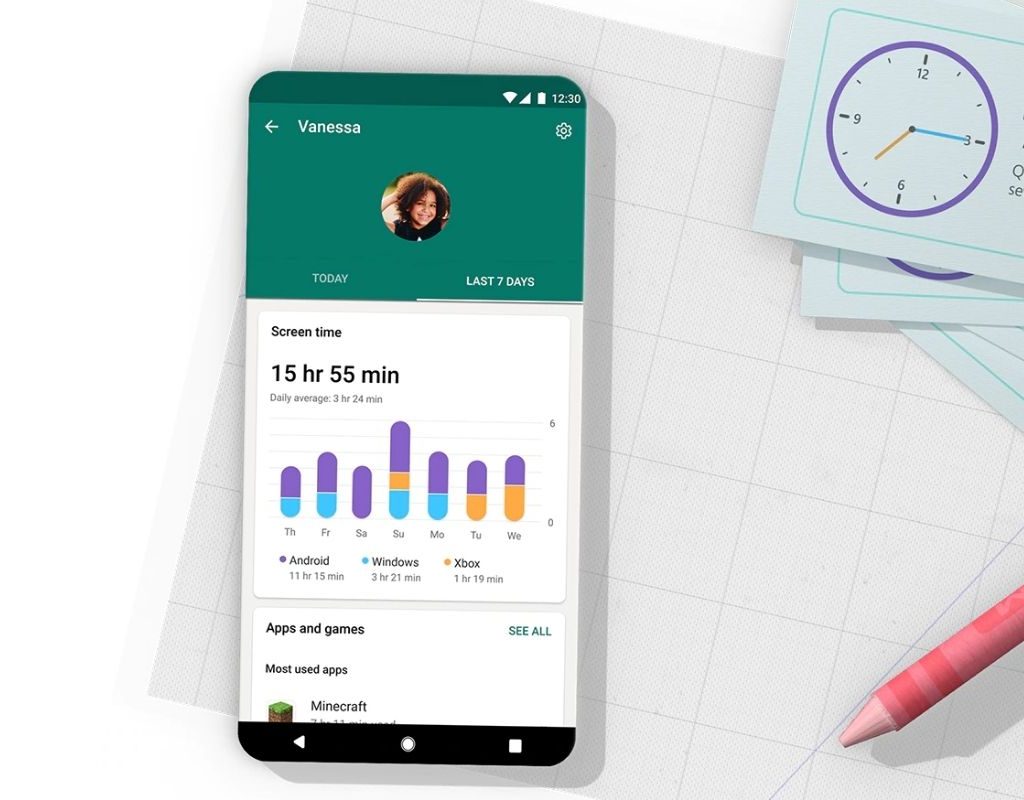
Screen time
Set screen time limits for your child on their devices (including Xbox) for their whole device, as well as by app or game. Kids are able to send a request for more screen time when it runs out and you can choose to add more or not. You’ll also get activity summaries of how your child used their screen time.
Content filters
Limit what your children can access when they’re browsing online by setting search filters and web filters so they only have access to kid-friendly sites. You can also limit what they download with filters set for apps and games. The filters help to block anything inappropriate.
Location sharing
Have your child’s device share its location with you so you can see where he is on a map at all times. You’re also able to save places he visits most, like school and home.

What else does the Microsoft Family Safety app have?
For $99.99 per year (after a one-month free trial) you can add a few more features to the app: location alerts and driving safety.
Beyond free location sharing, the paid version also includes location alerts so you can get alerts when your child goes somewhere new.
All driving safety features are only available in the paid version of the app. Once your teen is driving, you can access driving safety reports and driving history as long as your child’s phone is in the car with them when she drives.
Is the Microsoft Family Safety app safe?
Microsoft works to protect your data and doesn’t sell or share your family’s location data or driving data with insurance companies.
You can choose to turn off or pause location sharing at any time and still use the other features if you have concerns about sharing your child’s location.
Is the Microsoft Family Safety app worth it?
Since it’s a free app, there’s really no downside to trying it out. While other apps offer similar features, the Microsoft Family Safety app brings them together under one trusted name.
However, there are a few limitations to note to make sure the app works with your situation. If your child is using an iPad or iPhone, note that the screen limit features do not work with Apple apps. Also, the driving features only work in the United States, Canada, United Kingdom, and Australia.
Overall, this app is a valuable resource for parents and is definitely worth a try.